
A chair can look perfectly sized on a product page and still be wrong for the desk.
The seat may be 22 inches wide, yet the armrests stop at the desk edge. The chair may slide under the top, yet its five-star base catches a pedestal. A reclining backrest sounds useful until it meets the file cabinet behind the user. Add an extending footrest, and a compact executive office can lose its walkway whenever someone takes a short break.
None of those problems means the chair is badly designed. They mean chair fit is dynamic. A useful office chair has to support the person, meet the desk at the right height, and move through the room without colliding with the furniture around it.
This guide starts with that complete fit. It also explains where features found across Anzhap office chairs - breathable mesh, lumbar support, headrests, swivel bases, reclining backs, leather upholstery, and footrests - add real value. The point is not to collect the longest feature list. It is to choose advantages that suit the work and confirm there is room to use them.
A Chair Has More Than One Footprint
The width and depth in a specification describe one state of the chair. Daily work creates several others.

Parked footprint: The chair is empty, upright, and pushed toward the desk. This is the smallest state and the one most likely to appear in a floor plan.
Occupied footprint: A person is seated, with feet, elbows, and the back of the chair extending beyond the product outline. The armrests may also be set wider or higher than they were in the product photo.
Working movement: The user rolls back, swivels toward a file cabinet, or turns to stand. The caster base moves with the chair, so the required area is wider than a straight pull-back lane.
Reclined footprint: The backrest travels toward the wall while the user's knees and feet move forward. If the chair has a footrest, its deployed position becomes a separate front projection.
This is why there is no single office chair clearance number that works for every model and room. A compact mesh task chair and a high-back reclining executive chair do not move the same way. Measure the exact option, then reproduce its farthest movement in the intended location.
Measure the Part That Will Actually Collide
When a chair fails to fit, the listed overall width is not always the missing measurement. The collision may come from an armrest, caster, headrest, or moving backrest.
Start With the Widest Setting, Not the Seat Cushion
Ask whether the published width is measured across the seat, armrests, or base. If the arms move inward or outward, request the width at the intended setting. For a five-star base, request the outside diameter or widest point across the casters.
This matters in narrow desk openings. A cushion may pass between two pedestals while the arms or base do not. It also matters in rows of workstations, where two chairs can be parked neatly but overlap when both users turn at the same time.
Compare Armrests With the Clear Underside of the Desk
Desktop height is not the same as desk clearance. Measure from the floor to the lowest obstruction where the chair will enter. That obstruction may be an apron, drawer, keyboard tray, support rail, cable tray, control box, or the underside of a return.
Then compare that clear height with the armrest height at the user's working seat position. Do not lower the chair only to make the arms fit if that leaves the user at an unsuitable relationship to the keyboard and floor. The desk and chair need to work together.
Fixed armrests can provide a consistent place to rest the forearms, but their height must suit the desk. Adjustable arms offer more setup flexibility, especially when a chair may move between desks, yet their minimum and maximum positions still need to be verified.
Treat the Base as Working Hardware
The base affects stability, movement, and how the chair approaches the desk. A swivel caster base is useful when the user regularly turns between a monitor, side return, printer, and nearby storage. That convenience disappears if a caster hits the desk pedestal or drops into the edge of a floor mat.
Check the actual floor condition. Test carpet transitions, rug edges, thresholds, floor-box covers, and gaps between hard flooring and a chair mat. Caster suitability and floor-care requirements vary, so follow the chair and flooring manufacturers' guidance rather than assuming one wheel type works everywhere.
Choose Chair Benefits Around the Work Being Done
Features are valuable when they match a repeated part of the workday. They become clutter when they are selected from a checklist and never used.
Breathable Mesh Makes Sense for Desk-Heavy Work
Mesh backs allow air to move through the backrest instead of placing a continuous upholstered surface behind the user. That can be useful in warm offices or at workstations occupied for long periods. A shaped back and lumbar area can also provide more intentional contact than a flat backrest, provided the support meets the user's body in the right place.
Anzhap's mesh office chair with lumbar support and headrest is listed in configurations including 24-inch overall length with 18- or 20-inch widths and different overall heights. It illustrates why the selected configuration matters: similar-looking versions can occupy different amounts of space. The mesh back and headrest are useful features to compare, but buyers should still confirm seat-height range, arm dimensions, base width, and the exact option shown in the order.
A headrest is most useful when the user's head actually reaches it in an upright or reclined position. It should not be treated as automatically beneficial simply because it appears in the product title. Test contact and adjustment if possible.
Recline Is an Advantage Only When the Room Allows It
A reclining back can provide a useful change of position for reading, calls, or a short pause between tasks. In a private office, it may also make the chair more comfortable for conversations that do not require continuous keyboard use.
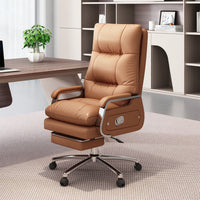
Anzhap's 22-inch-wide reclining leather office chair is listed at 22 inches wide by 20 inches deep and 49 inches high. Its product description includes a 135-degree recline, fixed armrests, and a five-star caster base, with genuine- and synthetic-leather options. Those features create a distinct executive-chair experience: a high back, upholstered arm support, material choices, swivel movement, and a defined recline range.
They also create measurements that cannot be skipped. Fixed arms must clear the desk at the intended seat height. The high back must clear shelves or wall-mounted items when the chair moves. The 135-degree position needs to be tested against the wall, cabinet, and traffic behind the user. The product's closed depth does not show that full movement.
A Footrest Is for the Reclined Position, Not the Typing Position
An integrated footrest can support the lower legs during a deliberate reclined break without adding a separate ottoman to the office. This is most useful where the user has room to lean back and extend the mechanism fully.
Selected versions of Anzhap's reclining leather office chair with footrest include a footrest and leather choices such as Nappa or microfiber leather. The listing also describes padded armrests and layered cushioning. These are meaningful benefits for someone seeking a more upholstered, lounge-like executive chair rather than a light task chair.
Before choosing that option, request the chair's depth with the back fully reclined and the footrest completely extended. Confirm how the footrest deploys and whether the user can close it without hitting the desk. In an aisle-facing position, test the extended footrest while another person passes. A useful comfort feature should not turn into a temporary barrier.
Run the Desk Test in the Order You Will Use the Chair
A short physical test is more revealing than comparing isolated numbers. Use painter's tape and the actual desk whenever possible.

- Set the working seat height.Begin with the user's normal relationship to the keyboard and floor. Do not begin by forcing the chair under the desk.
- Mark the widest chair component.Tape the armrest width and base diameter, using the selected chair configuration rather than a generic chair symbol.
- Check the approach to the desk.Roll forward until the user reaches a comfortable keyboard position. Watch the arms, casters, desk legs, pedestal, and any equipment mounted below the top.
- Roll back and stand normally.Include the user's feet and the chair's path. Repeat with a room door, cabinet drawer, or nearby chair in use.
- Turn toward real work.Swivel toward the file cabinet, printer, side return, or visitor chair that the user will actually reach during the day.
- Test the largest movement last.Recline to the intended angle and deploy the footrest if included. Mark the farthest rear and front points on the floor.
Record the test with one top-down photo. Write the product option, seat-height setting, arm setting, and whether the footrest was included. That prevents a correct test from being attached to the wrong variant later.
Match the Chair Style to the Workspace
The best advantage depends on where the chair will live.
At a full-day computer workstation, adjustment range, mesh airflow, lumbar contact, desk fit, and easy movement to nearby storage may matter more than a deep recline. A chair that can approach the keyboard without armrest interference is likely to be more useful than a feature-rich chair that remains too far from the desk.
In an executive office, a taller upholstered back, leather finish, padded arms, and a controlled recline can support a more formal appearance and a wider range of seated activities. The office must also provide enough distance behind the chair to use those features.
At a shared or hoteling desk, adjustment becomes more important because the next user may have a different body size and preferred setup. Confirm that adjustment controls are understandable and accessible, and that the chair's ranges suit the intended user population. No single chair should be described as a guaranteed ergonomic fit for everyone.
In a conference room, chairs are repositioned frequently and used beside other chairs. Overall width, arm shape, base movement, and the ability to approach the table can matter more than a footrest or deep recline. Test several chairs together rather than judging one in isolation.
For broader planning across rows, pods, and shared circulation, Anzhap's office seating plan guide explains how occupied chairs affect layout. Use the room-level plan first, then apply the chair-level movement test here to the exact model.
Two Chairs Can Fit Separately and Fail Together
In a workstation row, the critical moment is often simultaneous movement. One chair rolls back while the chair behind it is already occupied. A user swivels toward a shared printer as someone walks through the cross-aisle. Two adjacent users reach pedestal drawers at the same time.
Run at least one test with every neighboring chair pulled out to a normal working position. If the chairs overlap, changing only the chair width may not solve the problem; the desks, storage, or aisle orientation may need to change. The same test should include backpacks, waste bins, mobile pedestals, and floor power covers that occupy the chair zone in real life.
Do not count on employees keeping chairs perfectly centered or fully pushed in. A workable layout tolerates ordinary movement without turning every adjustment into a negotiation with the next workstation.
Ask for the Dimensions That Describe Use
If a product page does not publish the needed measurements, send a request tied to the exact SKU or option:
Please confirm the overall width at the armrests, five-star base diameter, minimum and maximum seat height, armrest height at those settings, upright depth, fully reclined depth and angle, footrest projection if included, and assembled package dimensions. Please confirm that the drawing and measurements apply to the exact color, material, base, and feature option in my cart.
Also ask whether the dimensions include handles, control levers, casters, and headrests. Product images may combine several options, and a feature shown in one photo may not be included in every version.
The answer should let you mark the chair's largest working state. If it repeats only the width, depth, and height of the upright chair, the fit check is not finished.
Before Checkout, Use the Chair Like a Chair
Stand at the intended desk and confirm that:
- the chair approaches the keyboard at a suitable working height;
- armrests clear the lowest desk obstruction at the intended setting;
- the base passes between desk legs, pedestals, and floor obstacles;
- the user can roll back, turn, and stand without moving another piece of furniture;
- a reclining back clears the wall, storage, and anything mounted behind it;
- an included footrest can deploy and close without blocking the main route;
- neighboring chairs have been tested in occupied and pulled-back positions;
- the selected upholstery, base, headrest, recline, and footrest options match the order;
- the assembled chair and its package can reach the room through the delivery path.
That last check is intentionally practical. A benefit counts only when the chosen chair can be delivered, adjusted, and used in the actual workspace.
Frequently Asked Questions
How much space does an office chair need?
Use the largest working position of the exact chair, not a universal number. Mark the base and arm width, occupied position, rollback path, swivel movement, fully reclined depth, and footrest projection if included. Then test neighboring furniture and traffic at the same time.
Why does a chair fit under the desk but still feel too far away?
The armrests, desk apron, drawer, keyboard tray, or cable tray may stop the chair before the user reaches a comfortable keyboard position. Measure the desk's lowest underside obstruction and compare it with the armrest height at the intended seat setting.
Is the listed chair width measured across the armrests?
Not always. It may describe the seat, body, armrests, or another overall point. Ask the seller how the measurement was taken and request both the armrest width and the widest dimension across the base for the exact model.
Is a mesh office chair better for long workdays?
Mesh allows airflow through the backrest, which many users value during extended desk work. Comfort and support still depend on the shape, adjustment range, seat, lumbar contact, and individual user. Compare the complete fit instead of choosing by material alone.
Is a reclining office chair with a footrest practical for work?
It can be useful for reading, calls, or short reclined breaks in an office with enough space. It is less practical if the extended chair blocks an aisle, hits storage, or cannot close beneath the desk. Request the fully deployed dimensions before ordering.
Do adjustable armrests guarantee that a chair will fit under a desk?
No. Their lowest position may still be above the desk's clear underside, and the base or seat may be too wide for the opening. Adjustable arms improve setup flexibility, but the minimum height and full chair geometry still need to be checked.
The Right Chair Fits the Person, Desk, and Room
An office chair is not successful because it has the most features. It is successful when the useful features can be used without fighting the desk or the room.
Choose mesh, lumbar support, headrest contact, leather upholstery, recline, swivel movement, or a footrest because each one answers a real part of the workday. Then measure the chair in motion. The parked footprint gets it into the floor plan; the working footprint determines whether it belongs there.
Browse Anzhap's office chair collection after checking the desk underside and the chair's complete movement envelope for the selected configuration.