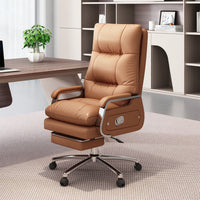

An office chair can look like the better value because it has a headrest, a deep recline, and a footrest tucked under the seat. Then it arrives and the compromises become visible. The headrest pushes the user's head forward during typing. The footrest cannot extend while the chair is close to the desk. The backrest reaches a cabinet before it reaches the advertised angle.
Those features belong to particular moments in the workday. A headrest can help during calls or reading, and a built-in leg rest can support a short break. None of them rescues a seat that is too deep, misplaced lumbar contact, or armrests that hold the chair away from the keyboard.
The practical question is not whether an office chair with footrest is good in general. It is whether the chair still works well at 10 a.m., when the user is upright and typing, and whether there is enough room to use the extra equipment at 3 p.m.
Start With the Chair at 10 A.M., Not the Break at 3 P.M.
Most feature-rich chair photos show the most relaxed position. That image is useful for understanding the product, but it should not set the buying order. Start with the position that will be used for the largest part of the day.
Set the chair at a comfortable working height. The feet should be supported, the seat edge should not press into the backs of the knees, and the user should be able to reach the keyboard without leaning forward. Check where the lumbar area meets the back. Then bring the chair toward the desk and watch the armrests, seat, control levers, and caster base.
If this basic setup fails, a longer feature list will not fix it. Optional equipment should be judged only after the working position is sound. That order is especially important when comparing chairs online, where a dramatic recline angle is easier to advertise than seat-depth fit or the location of the lumbar curve.
A Built-In Footrest and a Desk Footrest Solve Different Problems
The word “footrest” is used for two products that do different jobs.
A stable floor footrest sits under the desk and supports the feet when the chair must remain high enough for a fixed work surface. It belongs to the upright typing setup.
A retractable office chair footrest is better understood as a leg rest. It supports the lower legs during recline and projects into the knee space or aisle, so it is not meant to remain extended close to the desk.
Someone whose feet do not reach the floor at the correct keyboard height may need a stable floor support. An integrated leg rest does not solve that upright setup.

Before paying for a built-in footrest, check three details:
- Usable length:A short support may meet the calves rather than the feet. Confirm where it will make contact.
- Deployment path:The mechanism may pull, lift, rotate, or unfold. Test the motion beside the desk.
- Return motion:The user should be able to close it without twisting around an armrest or hitting the desk.
If the office has a narrow aisle, place tape on the floor at the end of the deployed support and try walking past it. A footrest that feels convenient in a private office may become a recurring obstacle in a shared room.
The Headrest Test Is Simple: It Should Support, Not Steer
An office chair with headrest often makes the most sense when the user reclines, takes calls, watches a presentation, or reads away from the keyboard. In those positions, a well-placed headrest gives the head somewhere to settle.
During upright computer work, sit without deliberately reaching backward. If the headrest pushes the chin forward or meets the neck awkwardly, more padding will not correct its location.
Check whether the headrest moves up and down, changes angle, or can be removed. If it is fixed, compare its position with the actual user. A tall backrest does not guarantee useful contact for every body size.
Also check the headrest in the deepest position the room allows. A headrest may clear the wall when the chair is upright but strike it early in recline. This is one reason the overall upright depth is not enough to judge office chair recline clearance.
Recline Is a Space Decision as Much as a Comfort Decision
A reclining office chair changes at both ends. The top of the backrest travels rearward while the user's knees and feet move forward. If the chair includes a leg rest, the forward reach increases again. Meanwhile, the caster base may roll slightly as the user settles into the position.
Do not use one generic wall-clearance rule. Backrest geometry, user size, and footrest design affect the envelope. Ask for the fully reclined depth of the exact configuration, then mark it with tape.
The test should include what is normally behind and beside the chair: a wall-mounted shelf, credenza handles, a visitor chair, a door swing, and the route another person uses to pass. It should also include the chair's approach to the desk after the user returns upright.
For a more detailed room check, use Anzhap's guide to chair fit, swivel, and recline clearance. That guide treats the chair as a moving footprint rather than a static rectangle.
Then test the recline controls themselves. A useful mechanism should allow the user to find and leave the intended position without searching beneath the seat. Confirm whether the backrest locks at several angles or only in selected positions, and whether resistance can be adjusted. “Reclining” does not describe one universal mechanism.
Pay for the Basics Before the Extras
The most valuable ergonomic office chair features are usually the least dramatic ones. They affect every hour the chair is used, not only the occasional break.

Core fit comes first. Check the seat-height range, usable seat depth, lumbar contact, armrest relationship to the desk, and whether the base and casters suit the floor and desk opening. A five-star base offers a broad support footprint, but its actual diameter still has to pass the desk legs and nearby furniture.
Controls come next. Seat-height levers, recline locks, tension controls, arm adjustments, swivel, and casters should be reachable and understandable. A control that exists but is awkward to use often remains in one position.
Optional comfort comes last. A headrest, deep recline, retractable footrest, and removable cover can all be worthwhile. Each should answer a specific use case: video calls away from the keyboard, reading, short breaks, or easier cleaning. “More features” is not a use case.
This order protects the buyer from paying for equipment that cannot be used because the core dimensions are wrong.
Three Anzhap Chair Profiles, Three Different Jobs
The Anzhap office chair collection includes task-oriented mesh chairs as well as models with headrests, adjustable backs, and retractable footrests. Comparing them as work profiles is more useful than trying to declare one design the winner.
For Upright Desk Work: Keep the Moving Parts Focused
Anzhap's 23-inch office chair with breathable mesh and lumbar support is the task-focused reference point. Its listing describes a mesh back, integrated armrests, a thick seat cushion, tilt, 360-degree swivel, and a five-star caster base. The published overall dimensions are 23 inches long, 25 inches wide, and 41 inches high, with about 2 inches of seat-height adjustment listed.
This profile suits desk approach, typing, swiveling to storage, and routine workstation movement. Mesh airflow and lumbar contact remain relevant throughout the session, while fewer mechanisms need to fit beneath the desk.
The practical checks are still specific: verify the working seat height for the user, make sure the integrated arms clear the lowest desk obstruction, and measure the caster base against the opening. “Task chair” does not mean “fits every task desk.”
For Flexible Rooms: Check How the Chair Changes Shape
Anzhap's folding mesh office chair with headrest and reclining back is listed at 23 inches long, 23 inches wide, and 46 inches high. The page describes a steel-and-mesh construction, integrated headrest, seven-position adjustable backrest, retractable footrest, and a folding design; it also lists no assembly as required.
This combination may suit a room that shifts between upright work, calls, and storage. It also creates more states to verify. Ask for the folded dimensions, deepest reclined position, and footrest projection for the selected variant; “folding” alone does not show whether it fits the intended closet.
For Deeper Recline: Treat the Footrest as a Selected Configuration
Anzhap's wide reclining office chair with optional hidden footrest is listed in versions with and without the footrest. The page shows overall dimensions of 24 inches long, 22 inches wide, and 44 inches high, adjustable armrests, a backrest range from 90 to 160 degrees, and a removable zippered cover.
The key word is “optional.” Match the feature description, images, and SKU in the cart rather than assuming every configuration includes the hidden footrest. For the version that does, check the backrest's farthest rear point, the leg-rest path, and the return to upright.
This profile is best judged by planned use. If the user regularly takes calls or reads away from the keyboard and the office has a protected recline zone, the extra equipment may earn its space. If the chair is confined between a fixed desk and a cabinet, much of the feature set may remain unused.
Run This Five-Minute Test Before Checkout
Use the actual user, desk, and room whenever possible. If ordering online, reproduce the seller's confirmed dimensions with painter's tape.
- Set work mode first.Use the intended seat height and place the feet on the floor or a stable floor footrest. Check seat depth, lumbar contact, and keyboard reach.
- Approach the desk.Roll forward and watch the armrests, seat edge, levers, caster base, drawer, apron, and cable tray. Do not lower the chair only to make it disappear under the desktop.
- Check the headrest without posing.Sit upright, then recline. Note when the headrest first makes contact and whether it pushes the head forward.
- Use every recline stop.Confirm the control locations, lock positions, and resistance. Mark the farthest point reached behind the chair.
- Deploy and close the footrest.Keep the desk, nearby storage, and normal walkway in place. The complete action matters more than the final photo.
Record the test with a top-down photo and write down the exact variant. This small step prevents measurements from one chair option being used to approve another.
Shared Offices Need Adjustment Range, Not Maximum Feature Count
At a shared desk, the next person may have a different height, seat-depth preference, and armrest setting. Before buying several chairs, ask two or three likely users to set up the same sample without coaching. Hard-to-find controls and a fixed headrest will create repeated friction. Test neighboring chairs together as well: one user may recline while another rolls back, and an extended footrest may cross the route to shared storage.
Questions Worth Sending to the Seller
Ask for answers tied to the exact color, material, and feature option in the cart:
Please confirm the seat-height range, usable seat depth, width across the armrests, caster-base diameter, upright depth, fully reclined depth, recline lock positions, headrest adjustment, and footrest projection. Please also confirm whether the selected SKU includes the footrest and whether the published dimensions apply to that exact configuration.
If the chair folds, ask for folded dimensions. For a removable cover, ask which sections detach and follow the stated care instructions. If the page shows several bases or mechanisms, request a labeled drawing for the selected version.
A useful answer should describe the chair in work mode, recline mode, and any folded or footrest-deployed mode. Upright length, width, and height alone do not describe how the chair will be used.
Frequently Asked Questions
Is an office chair with a footrest good for working all day?
The built-in footrest is mainly for reclined breaks, calls, or reading. All-day suitability depends more on seat fit, lumbar contact, working height, desk access, and usable controls.
Can a built-in footrest replace a footrest under the desk?
Usually not. A floor footrest supports the feet during upright work. A retractable chair footrest supports the lower legs after the chair reclines.
Do I need an office chair with headrest?
A headrest is useful when it supports recline, calls, or reading without pushing the head forward during upright work. Check its height, angle, and removability against the user.
How much room does a reclining office chair need?
There is no reliable universal number. Measure the exact chair at the intended recline angle, including the backrest's rear reach, the user's forward leg position, caster movement, and the full footrest projection. Test the wall, storage, door, and walking route together.
Is a deeper recline always better?
No. A larger angle matters only if the user wants that position, the mechanism supports it in a controlled way, and the room provides enough space. A moderate recline that is easy to adjust may be more useful than a deeper position that hits furniture.
Which feature should I prioritize on a limited budget?
Start with seat-height range, usable seat depth, lumbar contact, armrest and desk fit, stable base geometry, and controls that are easy to operate. Add a headrest, deeper recline, or footrest only when it matches a repeated activity and the room can accommodate it.
The Best Extra Is the One You Will Actually Use
An office chair with footrest can be worth buying when the user has a real break-mode use and enough space to deploy it. A headrest and recline add value when their position, controls, and room envelope work together.
The buying order remains simple: prove the chair works upright, prove it fits the desk, then prove the optional features can move through their full range. That is how an impressive product-page feature becomes a useful part of the workday instead of hardware that stays folded away.